# Quick Start
> Enable and schedule Profilarr upgrades for Radarr or Sonarr, preview your filter, and try example filters for your library.
A page from the Profilarr documentation by https://github.com/santiagosayshey, last updated 2026-10-04 (commit: https://github.com/Dictionarry-Hub/profilarr.com/commit/61d5e800052edaaa7b91d46b4bb84c0148fcc7ca). Web version: https://profilarr.com/deploy/upgrades/quick-start. Edit on GitHub: https://github.com/Dictionarry-Hub/profilarr.com/edit/develop/src/routes/(docs)/deploy/upgrades/quick-start/+page.svx
> Before turning upgrades on, decide what you want them to fix. Have you changed quality profiles, added better indexers, or found files you want to replace? If you aren't sure why you need upgrades, read [Upgrades](https://profilarr.com/deploy/upgrades) first, then come back with a goal.
Every upgrade run follows the same steps:
```mermaid
flowchart TD
%% rows: SCHEDULE FILTER MATCH COOLDOWN / SELECT SEARCH TAG
accTitle: An upgrade run
accDescr: The schedule starts a run. Mode picks a filter, its rules find matching library items, cooldown tags exclude previously searched items, and the selector and count pick which items the Arr searches. Profilarr tags the searched items and waits for the next scheduled run.
SCHEDULE["Wait for the
next run"] --> FILTER[Pick a filter]
FILTER --> MATCH["Find matching
library items"]
MATCH --> COOLDOWN["Exclude previously
searched items"]
COOLDOWN --> SELECT["Pick items using
selector"]
SELECT --> SEARCH["Ask the Arr
to search"]
SEARCH --> TAG["Tag the
searched items"]
TAG --> SCHEDULE
```
## Enable and Schedule Upgrades
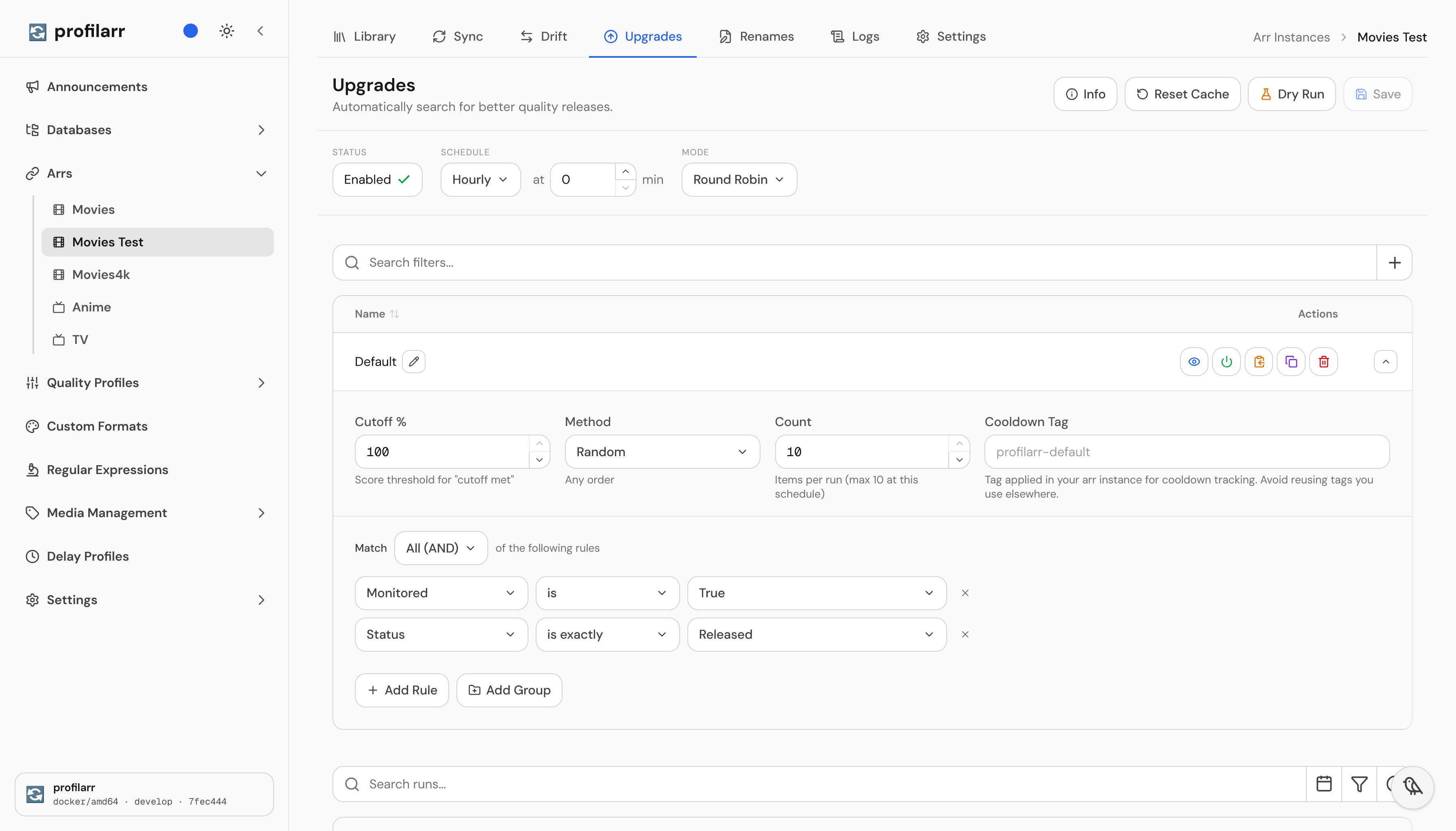
Open your Arr instance in Profilarr and go to **Upgrades**. Set **Status** to **Enabled**, choose **Hourly** at `0` minutes, and leave **Mode** as **Round Robin**.
## Add a Filter
Click `+` beside the filter search bar and choose **Default** to add a filter. Keep the default rules and **Random** method, then set **Count** to `10` for Radarr or `1` for Sonarr.
For Radarr, the default rules target monitored, released movies. Each run randomly selects up to ten matching movies and asks Radarr to search for upgrades.
Click **Save** to apply your settings.
## Preview Your Filter
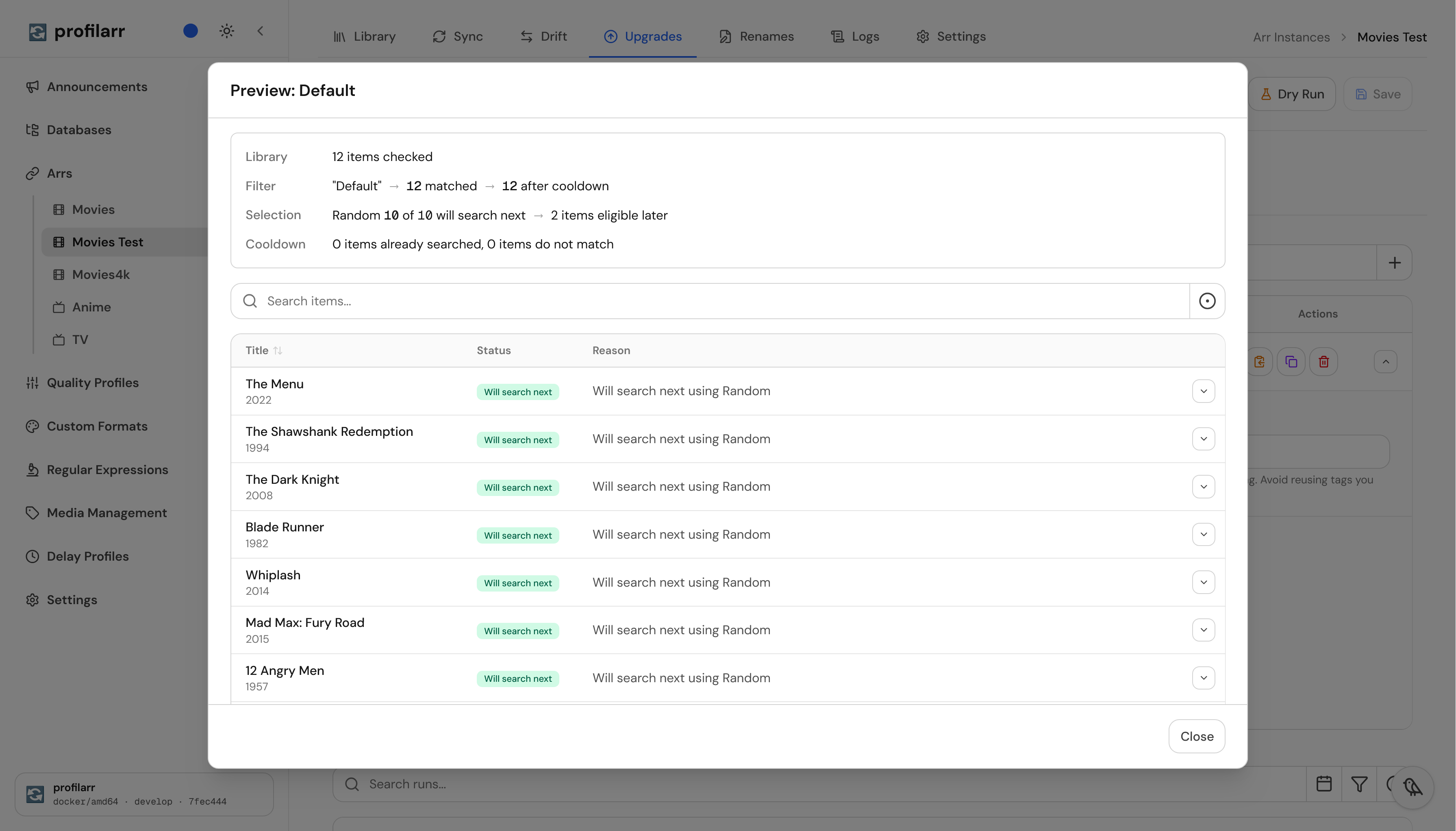
Click the **eye icon** beside your filter to preview the matching library items. Check that these are the movies you want Profilarr to search for upgrades.
## That's It
Profilarr will now select up to ten random monitored, released movies each hour and ask Radarr to search them again.
Upgrades can be as specific as you need them to be. If you just want to upgrade your library over time after changing profiles or adding an indexer, this setup is enough. You don't need to learn every filter, selector, or field to get started.
Read on for a few example filters you can use or adapt for your library.
## Example Filters
After choosing a filter below, click `+` beside the filter search bar and choose **Import**. Paste the JSON, preview the filter, and click **Save**. These examples use the hourly schedule above.
`Below Target (Radarr)`
After changing profiles, focus on monitored, released movies below their profile's custom format score target. Searches up to ten movies per run, starting with the lowest scores. This checks the score target, not the quality cutoff.
```json
{
"name": "Below Target",
"enabled": true,
"group": {
"type": "group",
"match": "all",
"children": [
{
"type": "rule",
"field": "monitored",
"operator": "is",
"value": true
},
{
"type": "rule",
"field": "status",
"operator": "eq",
"value": "released"
},
{
"type": "rule",
"field": "cutoff_met",
"operator": "is",
"value": false
}
]
},
"selector": "lowest_score",
"count": 10,
"cutoff": 100
}
```
`Banned Groups (Radarr)`
Replace files from groups you no longer want, especially after adding an indexer with better alternatives. Searches up to ten monitored, released movies matching the Banned Groups custom format, starting with the lowest scores. Change the format name if yours is different.
```json
{
"name": "Banned Groups",
"enabled": true,
"group": {
"type": "group",
"match": "all",
"children": [
{
"type": "rule",
"field": "monitored",
"operator": "is",
"value": true
},
{
"type": "rule",
"field": "status",
"operator": "eq",
"value": "released"
},
{
"type": "rule",
"field": "custom_format",
"operator": "includes",
"value": "Banned Groups"
}
]
},
"selector": "lowest_score",
"count": 10,
"cutoff": 100
}
```
`Favourites (Radarr)`
Give the movies you care about their own upgrade filter. Searches up to ten random monitored, released movies tagged favourites. Add that tag in Radarr or change the rule to a tag you already use.
```json
{
"name": "Favourites",
"enabled": true,
"group": {
"type": "group",
"match": "all",
"children": [
{
"type": "rule",
"field": "monitored",
"operator": "is",
"value": true
},
{
"type": "rule",
"field": "status",
"operator": "eq",
"value": "released"
},
{
"type": "rule",
"field": "tags",
"operator": "includes",
"value": "favourites"
}
]
},
"selector": "random",
"count": 10,
"cutoff": 100
}
```
`Finished Shows (Sonarr)`
Revisit completed shows when better releases or season packs become available. Searches one monitored, ended series per run, starting with the lowest average custom format score. Sonarr searches the whole series.
```json
{
"name": "Finished Shows",
"enabled": true,
"group": {
"type": "group",
"match": "all",
"children": [
{
"type": "rule",
"field": "monitored",
"operator": "is",
"value": true
},
{
"type": "rule",
"field": "status",
"operator": "eq",
"value": "ended"
}
]
},
"selector": "lowest_score",
"count": 1,
"cutoff": 100
}
```
> **Help wanted:** Have a filter you'd like to share? [Open a pull request](https://github.com/Dictionarry-Hub/profilarr.com/edit/develop/src/routes/%28docs%29/deploy/upgrades/quick-start/data.ts) with your filter and a short description of what it does and when it's useful.
## Next
- [Upgrades: Fields](https://profilarr.com/deploy/upgrades/fields): What each Profilarr upgrade filter field checks in Radarr and Sonarr, including custom formats, ratings, dates, and Cutoff Met.
---
Index of this site's Markdown pages: https://profilarr.com/llms.txt